
Frequently Asked Questions
Helping You Feel Confident in Your Care
Whether you’re a new or returning patient, these answers can help guide your healthcare journey.
BILLING
Making Payments
Learn about payment options, billing statements, and financial assistance resources.
What do I need to make an online payment?
To make an online payment, you will need the following:
- Account number (found on your statement)
- Patient’s first name, last name, and date of birth
- Email address (payer’s)
- Payment amount
- Credit/debit card, or bank routing and account number
Note: You do not have to be enrolled in the patient portal to make a payment online.
Billing department inquiries
For billing department inquiries and questions on deductibles, co-pay, and co-insurance, please see our billing department FAQ page.
Can I make a payment over the phone or in-person?
If you have any questions about the online payment process, or to make a payment over the phone, please call the Billing Office at 801.965.3720
Monday – Friday / 8 am – 5 pm
You can also mail your payment in the envelope that came with your statement or drop off a payment at any Granger Medical Clinic location during regular office hours.
If you are interested in setting up payment options, or if you have questions about an account in collections, please contact our business office at the phone number above. Granger Medical Clinic accepts MasterCard, Visa or American Express credit and debit cards.
TELEHEALTH
Virtual Care
Get answers to common questions about telehealth appointments and access.
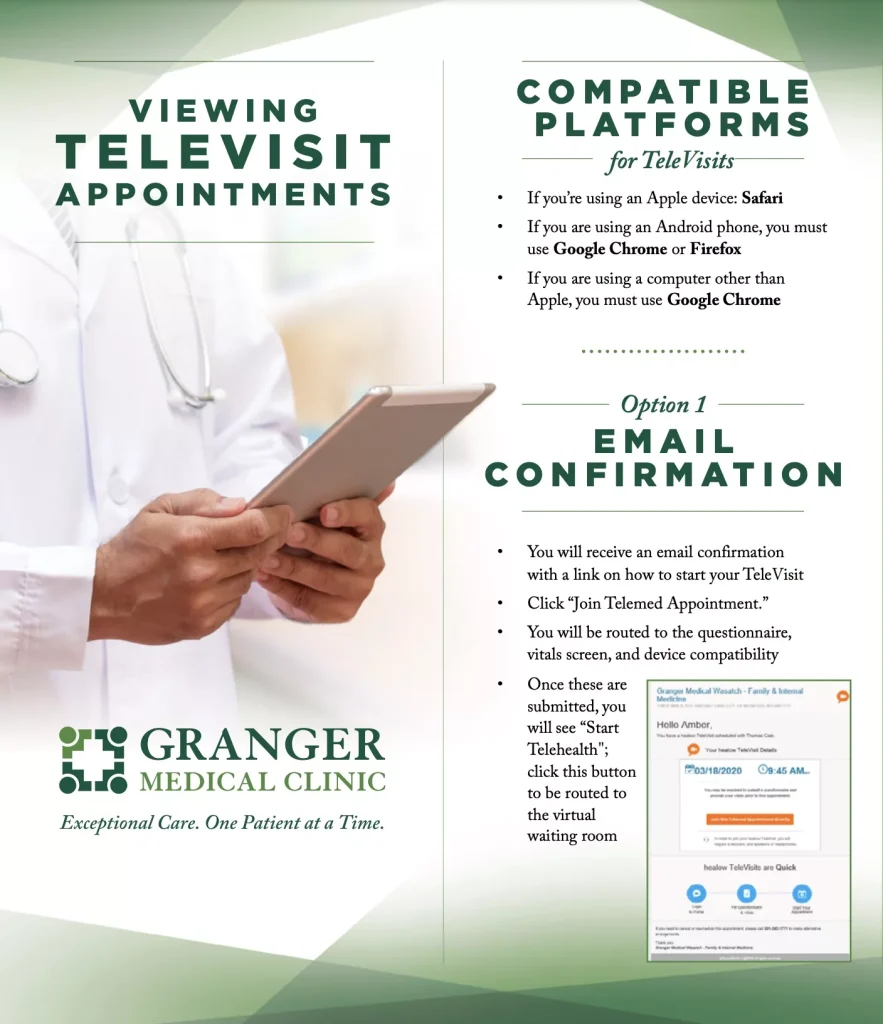
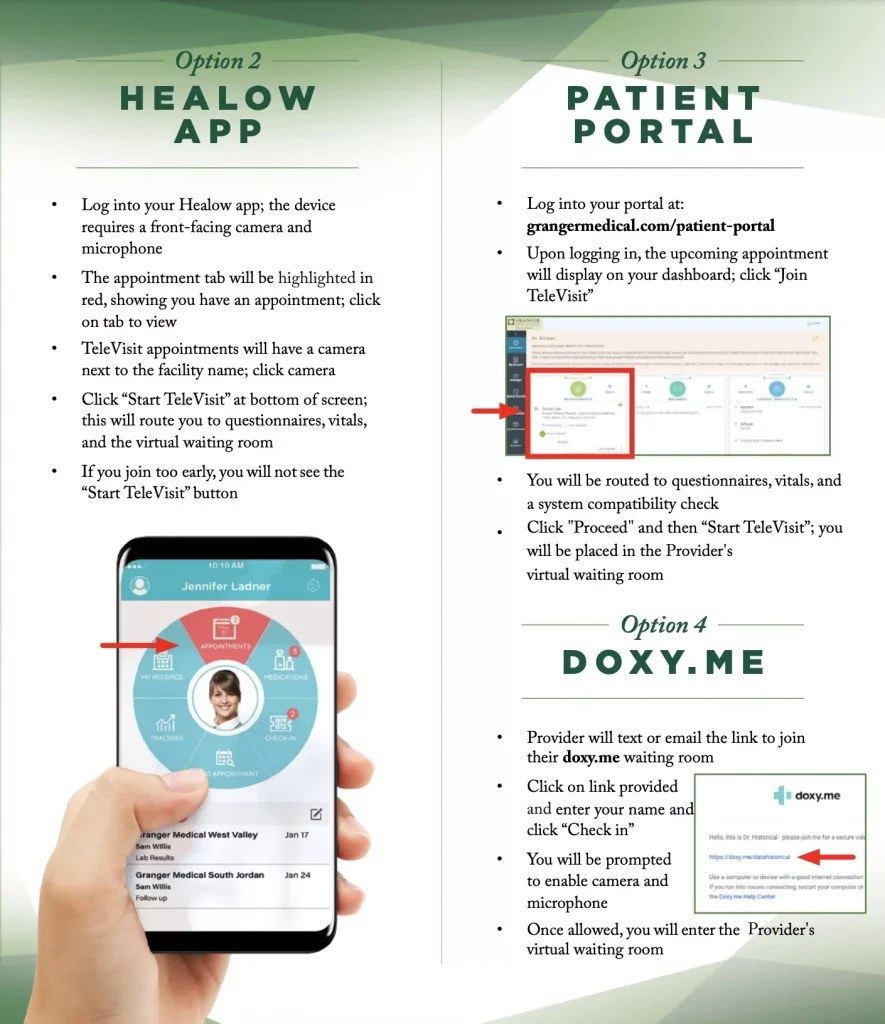
How do I schedule a televisit appointment?
- Contact your Provider’s office to schedule a televisit appointment. Visit our providers page to find your Provider’s contact information.
- Once your appointment is confirmed, you will receive instructions on how to connect using one of the options listed below.
If you experience any technical problems, please call 801.965.3762 for assistance.
Viewing Televisit Appointment
PATIENT PORTAL
Your Health Information at Your Fingertips
What can I do in the patient portal?
Access your medical information, communicate with your healthcare professionals, schedule appointments, request refills, and more. Call or visit your clinic location to register for Patient Portal access.
I have forgotten my username and/or my password. How can I access my account?
To reset your password, visit the patient portal password reset page or call us at 801.965.3531.
*It may take up to 72 hours to receive a temporary password for your account.
Hint: Usernames are typically a person’s first name, last name, and year of birth, or your full email address.
e.g., FirstLast1973
e.g., yourname@emailprovider.com
Can I see my lab results on the patient portal?
Yes! You can expect to see most lab results within seven business days of the result.
In some instances, lab results may not be published to the patient portal. If you don’t see your results, please contact your physician’s office.
Can I see my imaging and other ancillary results on the patient portal?
We are working on it! For now, you can call your physician directly for the results of any CT scans, X-ray, colonoscopies, or other ancillary services.
Can I view my medical records?
Medical summaries from the last two years can be accessed through the patient portal.
Please be aware that medical summaries are not complete records. To request a complete copy of our medical records, simply call 801.965.3471.
Can I access the patient portal using my smartphone?
Yes! Download the free Healow app from the Google Play or Apple App Store.
To learn more about the Healow app, click here.
Patient portal terms and conditions
You can read and print the current Terms and Conditions here. Please read the Terms and Conditions in their entirety before using the Patient Portal.